
 AI Inspiration World
How I Created These Landing Pages with Gemini 3
A step-by-step set of prompts for building a landing page with Gemini 3, from the hero section to button animations.
- Author
- MengTo ↗ (@MengTo)
- Models / tools
- Gemini 3
- License
- 未声明 · Excerpt
- Original language
- en
- Purpose
- Web & Apps
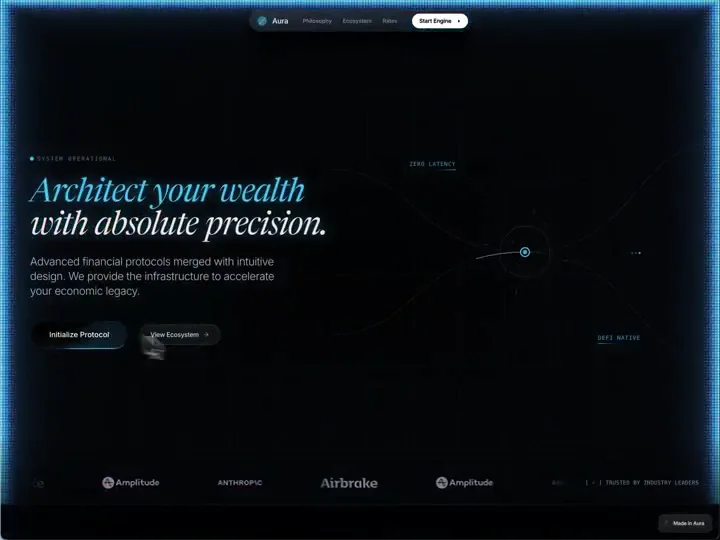
“Create the hero section for my {app} called {name} in the style of {reference_site}”.Read the full prompt in the author’s original post ↗Only an excerpt is shown here; full-text republication permission has not been verified.
Attribution required — keep the author’s name and original source when reusing this prompt. Author: MengTo | Original source ↗
How to use it
Models / tools: Gemini 3
- Start with the hero section in Gemini 3: fill your app name and reference site into the “Create the hero section…” line, and add a screenshot for better results
- Then use the post's short prompts for icons, the intro animation and the logo marquee
- Once you're happy with the hero, insert a screenshot and prompt “Adapt a new section, change texts, names and numbers” for the other sections
What it can do
This is a walkthrough by designer Meng To on X about how he built a set of landing pages with Gemini 3 from start to finish, with the exact prompts he used along the way. He spends half the time on the hero section, because the colors, typography and spacing set there are reused by the AI across the site; his prompt is "Create the hero section for my {app} called {name} in the style of {reference_site}", ideally with a screenshot. He then gives prompts for icons (Iconify sets), intro animations, a beam animation, a looping logo marquee, a border beam on the main button, and new sections. He also mentions Unicorn Studio for background animation, Midjourney and Nano Banana Pro for images, and ChatGPT for copy.
Who it is for
Designers and developers who want polished product landing pages from AI and are willing to refine them section by section.
Before you use it
- The author used Gemini 3; the workflow also mentions Unicorn Studio, Midjourney, Nano Banana Pro and ChatGPT, which need their own accounts. - Replace the curly-brace parts with your app name, reference site, icon set and button code. - The prompt itself is free; refer to your AI tool's website for its costs. - The author lists no license; the content belongs to the author.
Follow the stated license. Do not use the output to replicate someone else’s work or a real person’s likeness.
Based on the author's public posts. Not tested by AI Inspiration World.