
 AI Inspiration World
Added Nov 19, 2026
video-use
A video editing skill for creators who want to cut footage and add subtitles and animations through a coding agent.
- Ecosystem
- Agent Skills
- Skill category
- Media
- Creator / organization
- Browser Use(GitHub browser-use)
More images
Screenshot from the project's website. All rights belong to the original creator. Contact us if you would like it removed.
What it is
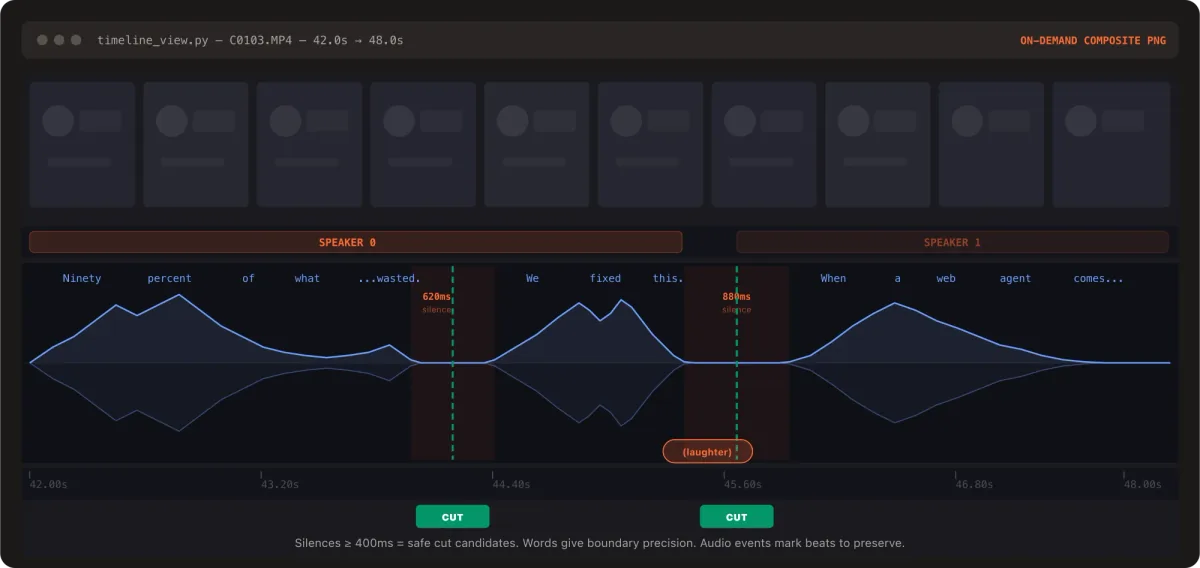
video-use is an open-source video editing skill from Browser Use for coding agents such as Claude Code and Codex. Put footage in a folder and describe your editing needs in conversation. The agent inventories the footage, proposes a plan, and produces the video after your approval. It uses transcripts and timeline information to assist editing and checks the rendered result.
Highlights:
- Cuts filler words and pauses, adjusts color, and adds subtitles.
- Creates animation overlays using HyperFrames, Remotion, Manim, or PIL.
- Checks cut boundaries for visual jumps, audio pops, and hidden subtitles.
How to use:
- First, install the skill and its dependencies as described in the project, and configure an ElevenLabs API key.
- Then, place your footage in a folder and tell the agent what edits you want.
- Finally, approve the plan and find the output video in the footage folder's `edit/` directory.
Who it's for:
Creators who want to edit footage through conversation and are comfortable with the basics of a coding agent.
Before you start:
You need Claude Code, Codex, or another agent with shell access, plus ffmpeg and the project dependencies. The tool reads footage from the specified folder and calls ElevenLabs Scribe once per source to generate a transcript, so an ElevenLabs API key is required. Make sure your footage is suitable for processing by that service. The project uses the MIT License; check the service provider for applicable fees.
Based on the project's public documentation. Not tested by AI Inspiration World.