
 AI Inspiration World
Added Nov 10, 2026
sweety-handdraw-video
A skill that turns a topic, article or story into a voiced, hand-drawn explainer video, for people making short explainer clips.
- Ecosystem
- Agent Skills
- Skill category
- Media
- Creator / organization
- threerocks(X @leo_xiaolei)
What it is
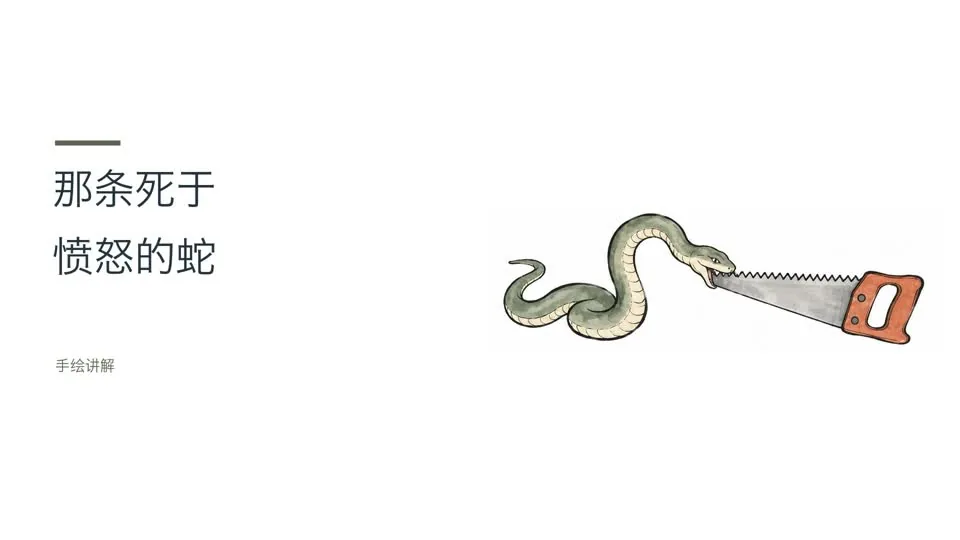
sweety-handdraw-video is a skill by GitHub user threerocks (X @leo_xiaolei). The README says it is hosted in Codex and Claude Code. Give it a topic, an article or a complete story, and it makes a voiced video of a hand drawing on paper while a narrator speaks. The agent understands the material, writes the narration, designs the boards and generates the illustrations; local tools then stroke the lines, fill the colour, handwrite the text, align the voice and export the file. The main renderer uses Python, Pillow, SciPy and FFmpeg. Finished videos do not use an external image-to-video model. The defaults are Simplified Chinese, a vertical 1280×1920 (2:3) frame and 30 fps. The sample in the repository, 《那条死于愤怒的蛇》, runs 49 seconds and moves from a snake's fight with a saw to how anger can make the harm worse. What sets it apart is that it finishes the full narration first, then calculates how many seconds and strokes each picture can take, and draws locally, stroke by stroke, with standard stroke order for Chinese characters. The script, assets, audio and timestamps stay in the project folder, so changing one subtitle line does not mean regenerating the pictures.
Highlights:
- It accepts a topic, an article or a complete story; when you ask it to keep the original wording, it does not rewrite it on its own.
- It generates the full narration, aligns it by section, and then times the line work, colouring, handwriting and captions to the voice.
- It includes 21 style entries and six hand presets (or just the pen), and writes Chinese characters in standard stroke order.
- The project folder keeps the assets and timestamps, so subtitle, pen-text or watermark-only edits can reuse unchanged pictures and audio.
How to use:
- First, install it with `npx skills add threerocks/sweety-handdraw-video --skill sweety-handdraw-video --agent claude-code codex --global --copy --yes`, or place the whole `sweety-handdraw-video` folder in your host's Skills directory.
- Then run `bash scripts/setup.sh` in the install folder to set up FFmpeg and the Python environment; add `--check` if you only want a check.
- Finally, in Claude Code say “use sweety-handdraw-video to turn … into a hand-drawn video” or type `/sweety-handdraw-video`; in Codex use `$sweety-handdraw-video`. Start with a short topic of a few dozen seconds to confirm the local setup and style.
Who it's for:
People who want a short, hand-drawn, narrated clip for an explanation, a story or an opinion.
Before you start:
It currently supports macOS and Linux with Codex and Claude Code; Windows is not promised. Codex can generate images itself; Claude Code needs an image tool, or you need to supply the illustrations, and it will stop and say so if it cannot generate images. Voice can come from local VoxCPM2 (the author tested it on Apple Silicon; you download the model yourself), a compatible VoiceStudio service, or a finished narration you already have. Cloud text-to-speech is only an option with your own keys, and is not the default. During install and production it installs dependencies, runs commands and writes files on your machine. If you use these features, weigh the safety risks yourself. AI Inspiration World is not responsible for any consequences. Only use text, images and voices you have the rights to, and declare AI-generated content when a platform requires it; you are responsible for compliance. The README does not give a fixed cost; the model host, image generation and local voice may incur costs, which are listed on each tool's website. The repository license is MIT. A few style and preset names borrow the names of other works and characters, so mind copyright when you use them.