
 AI Inspiration World
Added Nov 15, 2026
smartsearch
Lets AI tools like Codex, Claude Code and Cursor search the web, read original pages and cite sources.
- Ecosystem
- Agent Skills
- Skill category
- Research
- Creator / organization
- konbakuyomu(GitHub konbakuyomu)
What it is
smartsearch (Smart Search) is published on GitHub by konbakuyomu. It puts search, page reading and provider configuration in one place and connects them to AI tools such as Codex, Claude Code and Cursor, so your AI can search the web, read the original pages and answer with sources you can check. It has three parts: a standalone command line called smart-search, a desktop app for Windows and macOS, and Skills installed into your AI tools. Smart Search does not provide search itself. Searching and page reading are done by the providers you choose, with API keys you supply, saved in your local configuration folder. The default intent router is Jev semantic routing, and its judgments come from TypeSafe's Jev model. The app only manages settings; after you close it, your AI keeps calling the command line as its Skill describes.
Highlights:
- One setup covers search, page reading and providers
- Skills can be installed into 17 AI tools, including Codex, Claude Code and Cursor
- Both a command line and a desktop app are provided
- You pick the providers and bring your own keys
How to use:
- First install the command line: `npm install -g @konbakuyomu/smart-search@latest`, or download the desktop app from Releases.
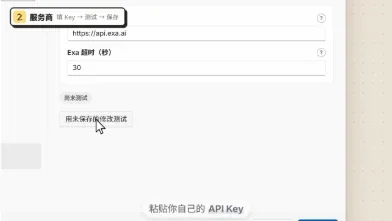
- Then run `smart-search setup` to set up providers and API keys, or configure them in the desktop app.
- Finally update Skills in the desktop app, choose the AI tools you use, and let your AI search the web.
Who it's for:
People who want AI tools like Codex, Claude Code and Cursor to search the web, read original pages and cite sources.
Before you start:
- The command line needs Node.js 18 or later. The desktop app supports Windows and macOS.
- You need to install and sign in to your AI tools yourself.
- You need your own API keys for the providers, saved in a local configuration folder.
- Searching and page reading go online through the providers you configure. Provider tests, searches and route --remote calls may use paid quota of those providers.
- Windows packages use a self-signed certificate and may trigger SmartScreen. macOS packages are not Developer ID signed or notarized.
- The project itself is free and open source under the MIT license.
Based on the project's public documentation. Not tested by AI Inspiration World.