
 AI Inspiration World
Added Nov 15, 2026
Skills Manager
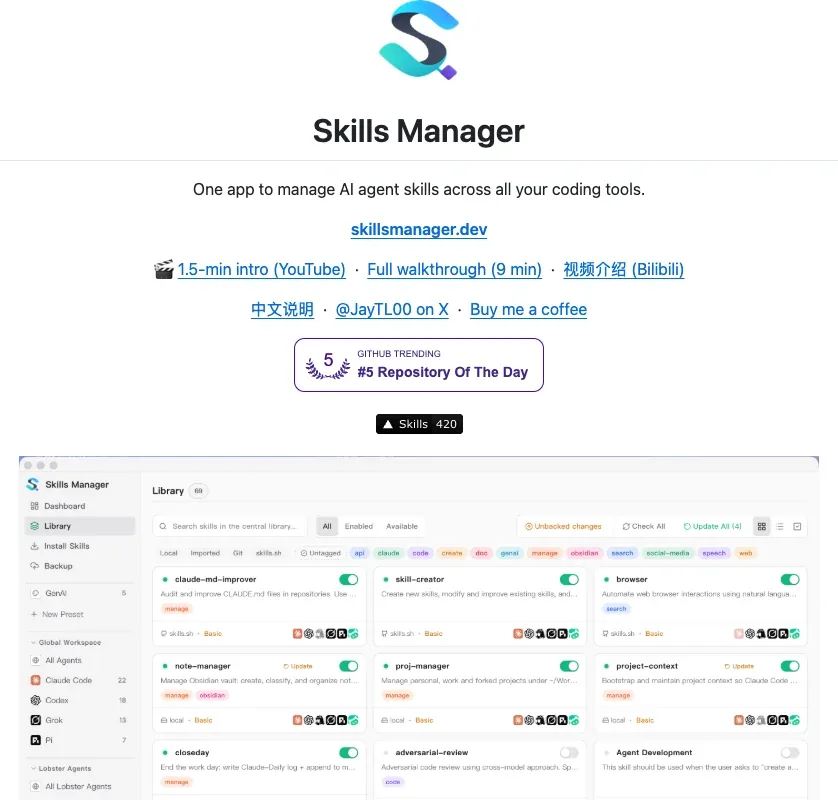
A desktop app that manages, syncs and backs up skills for coding agents such as Claude Code and Codex.
- Ecosystem
- Agent Skills
- Skill category
- Productivity
- Creator / organization
- xingkongliang(GitHub xingkongliang)
What it is
skills-manager is published by the GitHub user xingkongliang. It is a lightweight desktop app for managing, syncing and organizing skills for AI coding agents. It works with more than 50 coding tools, including Claude Code, Codex, Cursor, Copilot and Gemini CLI. Skills live in one shared library and can be deployed to each agent as needed. The project also ships a command line tool (CLI), so agents can install a skill, deploy it to another agent, or report where skills are. What sets it apart, per the page: one app for the skills of all your coding tools, with backup to your own Git repository and sync across devices.
Highlights:
- One skill library. Install skills from Git repos, local folders, .zip or .skill archives, or the skills.sh marketplace.
- Presets, plus project and global workspaces. Skills are deployed by symlink or copy.
- Connect a private GitHub repository or another Git remote to back up the library and sync devices.
- Includes a CLI, and a manage-skills skill you can install with npx skills add xingkongliang/skills-manager.
How to use:
- First install it: brew install --cask skills-manager on macOS, Scoop or an installer on Windows, AppImage, deb or rpm on Linux.
- Then add skills to the library from a Git repo, a local folder or an archive.
- Finally pick the agents you use and deploy the skills to them. Turn on backup and sync if you need it.
Who it's for:
Developers who use skills in several coding agents and want to manage them in one place.
Before you start:
- Runs on macOS, Windows and Linux. The CLI has separate binaries.
- It reads and writes each agent's skills folder and creates symlinks or copies files.
- Backup pushes your library to a private repository under your GitHub account. The sign-in token is stored in the system keychain. You can use another Git remote instead.
- The app checks for updates. Downloading, installing and restarting each need your click.
- The log export feature packs logs and activity history into a zip.
- The page does not state a price.
- License: MIT.
- If you use these features, weigh the safety risks yourself. AI Inspiration World is not responsible for any consequences.
Based on the project's public documentation. Not tested by AI Inspiration World.