
 AI Inspiration World
Added Nov 14, 2026
qiaomu-cut-skill
An agent skill that turns one sentence into a reproducible video project, covering footage, captions, transitions, rendering and checks.
- Ecosystem
- Agent Skills
- Skill category
- Media
- Creator / organization
- 向阳乔木(GitHub joeseesun)
What it is
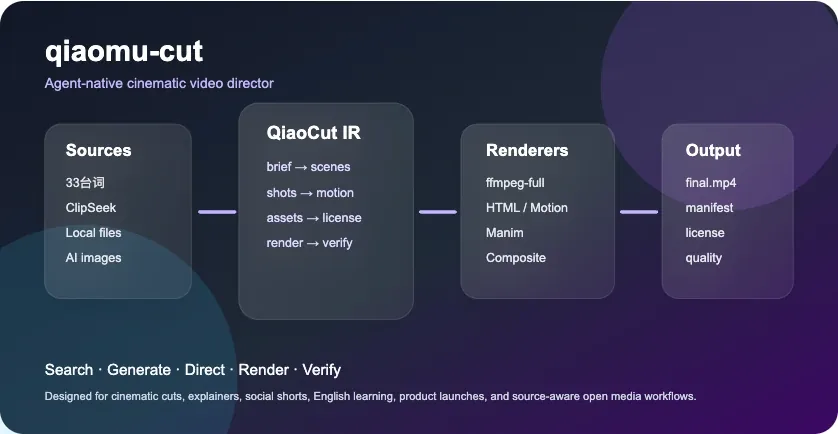
qiaomu-cut is an agent skill by 向阳乔木 (Joe). You describe the video you want in one sentence, and it organizes footage, storyboard, captions, transitions, motion, rendering and quality checks into a reproducible video project, finally composed with ffmpeg-full. It first creates a QiaoCut IR (intermediate description file), then routes to whichever engines the environment offers, such as 33台词, ClipSeek, Pexels, Pixabay, local footage, ListenHub, MarsWave, Coli local speech recognition, HTML and Manim. AI-generated images are marked ai_generated in the asset list and are not passed off as real footage or archive photos. The author also states that direct PPT output, complex masks and speed ramps are still external capabilities, not built in.
Highlights:
- Links finding footage, captions, transitions, rendering and checks into one repeatable workflow.
- Picks available footage sources and generation engines based on the environment.
- AI-generated assets are clearly marked in the asset list.
- Also includes a code-driven motion graphics studio (motion-design).
How to use:
- First install it with `npx skills add joeseesun/qiaomu-cut-skill --skill qiaomu-cut`, or copy it manually to `~/.agents/skills/qiaomu-cut`.
- Then run `node ~/.agents/skills/qiaomu-cut/scripts/qcut.js doctor --json` to check your environment, and `setup` to install missing dependencies.
- Finally, tell your coding agent the video you want in one sentence.
Who it's for:
People who want an AI agent to handle their video editing and production workflow.
Before you start:
- The page says ffmpeg timeline rendering is verified on macOS; Linux code runs but dependencies must be installed by hand and lacks clean-host proof; Windows is not supported yet.
- Requires Node.js 18 or later, and Node.js 20 or later when using ListenHub.
- `setup` installs ffmpeg-full, fonts, playwright with Chromium, Manim and the ListenHub CLI through Homebrew (apt on Linux) and npm; first use of local speech recognition may download a model file.
- It downloads footage from the internet and may call the remote ListenHub and MarsWave services. Remote operations need `--yes`, uploading local images, video or audio needs `--allow-upload`, and these may use credits or cost money.
- It reads the login state of the local 33台词 app, and the key in the LISTENHUB_API_KEY environment variable or the ListenHub local credential store. The page says login state is only reused, never uploaded.
- The page says footage found through ClipSeek must be checked against the original site's license, and it does not claim footage is cleared for commercial use. Movie and TV line clips do not gain public or commercial rights just because they can be downloaded.
- The price of the skill itself is not stated on the page. The license is MIT.
- If you use these features, weigh the safety risks yourself. AI Inspiration World is not responsible for any consequences.
Based on the project's public documentation. Not tested by AI Inspiration World.