
 AI Inspiration World
Added Nov 12, 2026
Hermes Voice Lab
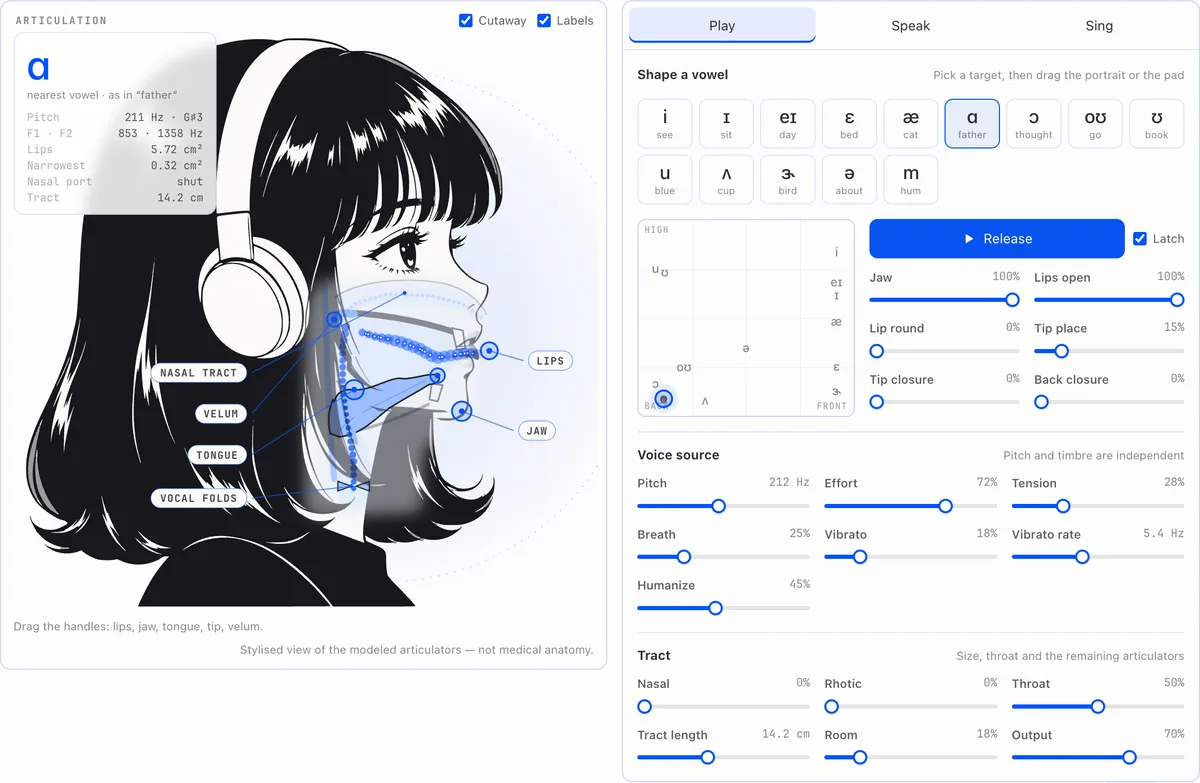
A local voice synthesizer plugin for Hermes Desktop that speaks and sings, with controls the Hermes Agent can adjust.
- Ecosystem
- Other
- Skill category
- Media
- Creator / organization
- Adolanium(GitHub Adolanium)
What it is
Hermes Voice Lab is a plugin for Hermes Desktop by Adolanium. It is a voice synthesizer built on a physical model of the voice. You can play it like an instrument, make it speak, sing, or lay down a beat. The Hermes Agent can also adjust its controls through tools: ask for a breathier voice, a different vowel, a spoken line or a short song, and the controls move in front of you. In the project's demo, the Hermes Agent runs on DeepSeek V4.1 Flash, writes what to sing, and the synthesizer sings it. Everything is synthesized locally by a Rust engine compiled to WebAssembly. The page says there are no recordings, no neural or cloud TTS, and no network calls. The default voice is an original fictional character voice made by the author.
Highlights:
- Synthesizes the voice from a simulated vocal tract and glottal source, with no recordings
- The Hermes Agent can adjust parameters through tools to make it speak or sing
- Sound is generated locally, and the page says there are no network calls
- The page says projects can be saved to a folder you authorize, and audio can be exported as WAV
How to use:
- First, on a machine with Hermes Agent, run `hermes plugins install Adolanium/hermes-voice-lab/plugin --enable`
- Then restart the gateway and enable Voice Lab under Capabilities → Plugins in Hermes Desktop
- Finally, press a play control to start sound, or ask Hermes to change the voice, say a line or sing a short song
Who it's for:
People who want to play with voice synthesis in Hermes Desktop and let the agent sing and shape the sound.
Before you start:
- Requires the Hermes Agent runtime; agent-side rendering uses Node 20+, provided by Hermes
- The page says the repository is private, so the installing machine needs Git access, for example by running `gh auth login` first
- Hermes warns that this is a custom source, not from the Hermes catalog
- Sound starts only after you press a play control; MIDI input works only if Hermes Desktop grants the permission, and the author says it was not tested with a physical device
- The page does not list exactly which data the plugin can read, and does not mention cost
- License: MIT
Based on the project's public documentation. Not tested by AI Inspiration World.