
 AI Inspiration World
Added Nov 3, 2026
Guizang PPT Skill
Has your AI agent build a single-file web slide deck with a presenter view and rehearsal timer built in.
- Ecosystem
- Agent Skills
- Skill category
- Design
- Creator / organization
- 归藏(GitHub 用户 op7418)
What it is
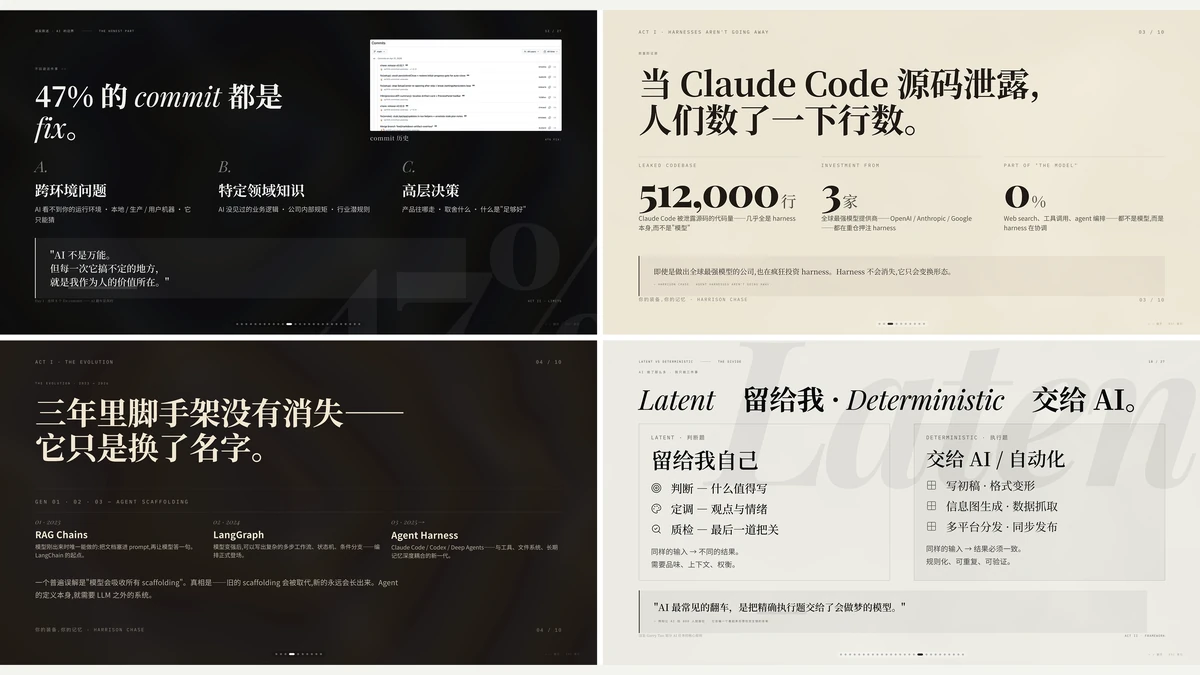
Guizang PPT Skill is a web slide Skill by Guizang (GitHub user op7418), made for AI agents such as Claude Code and Codex. Give the agent an article, Markdown, an outline, an old deck, screenshots or images, and it follows the Skill to build a single-file HTML deck that pages sideways. It can also make slide images and covers for different platforms. There are two visual systems: an editorial magazine look and a Swiss International style.
The speaking tools all live inside that one HTML file: speaker notes, a timer, rehearsal mode (it keeps your last 5 runs), a two-window presenter view, plus a laser pointer, on-screen circling, black and white screens, and a freeze option. The author says presenter mode needs only the HTML file and a browser, with no account or online service. The result is a web page; the Skill's core features don't include exporting a native PPTX file. The author describes it as a sister project to guizang-social-card-skill, also listed on this site: they share a look but are maintained separately.
Who it's for:People who give talks, teach or pitch, and want AI to produce a good-looking deck they can present from.
Before you start: Install with npx skills add, or git clone it into ~/.claude/skills/guizang-ppt-skill. The README lists Claude Code and Codex as supported. Cursor and other local agents need file access and shell commands, and WorkBuddy support is still in progress. You need Node.js for the theme and check scripts. The Swiss-style checker measures the layout when it can find Playwright and skips that step if it can't; it doesn't install Playwright for you. Any browser can show the deck. The author suggests the agent check for updates at startup and pull a new version only after you confirm.
It reads the articles, images and files you give it. Speaker notes, rehearsal records and display settings stay in your browser's local storage and aren't uploaded. Opening a deck loads Google Fonts and an icon script from the web, so it isn't fully offline. If you ask for AI images, the prompts and reference images go to your agent's image service, and any cost depends on that service. The review found no documentation of which online services the optional map component uses. It doesn't log in to any social account, doesn't post, doesn't install hooks or scheduled jobs, and isn't installed with curl piped to bash.
AGPL-3.0 license.
Based on the project's public documentation. Not tested by AI Inspiration World.