
 AI Inspiration World
More images
What it is
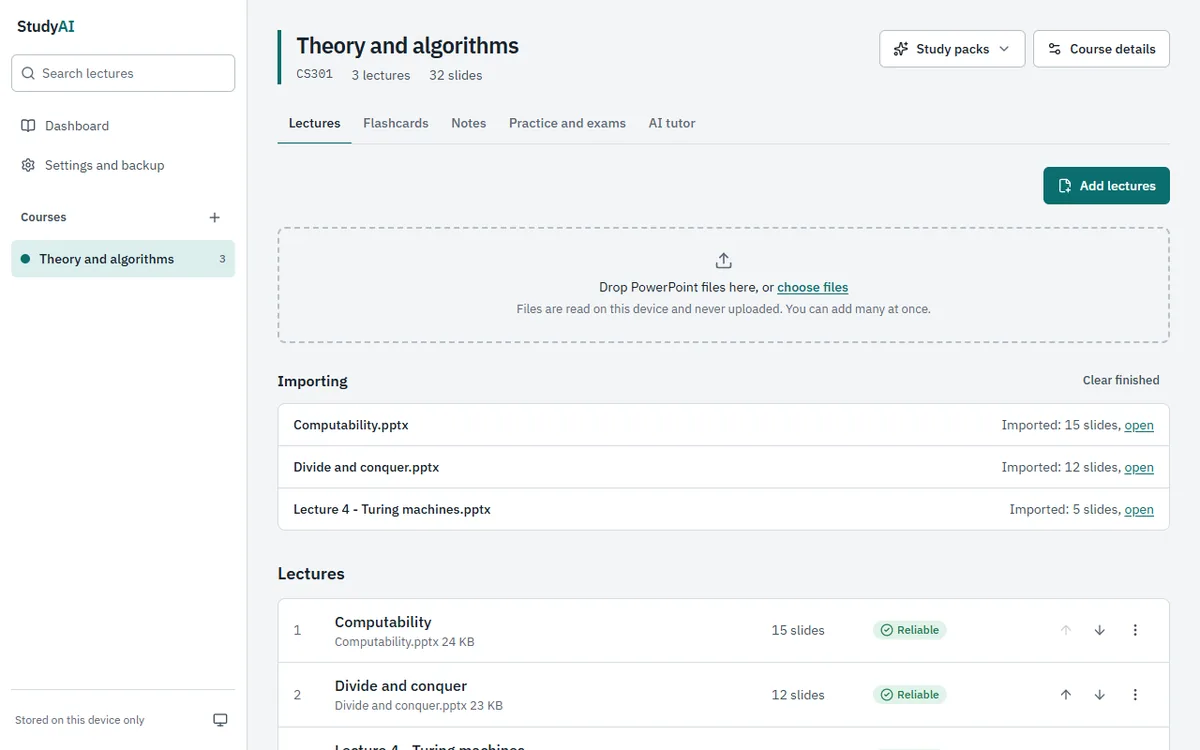
StudyAI is an open-source study platform by GitHub user zuhairhalawa, built for university lectures and local-first (your data stays in your own browser). You drop in PowerPoint files, read each slide beside the text the app extracted, search across lectures, and study with FSRS spaced-repetition flashcards and practice exams. The AI part is optional: the AI tutor answers from your own slides and says which slide each point comes from. The app checks AI output: every quote a model cites is looked up on the real slide, and every exam question is checked on your device, and nothing is used until you approve it. It is used in the browser, and the README also shows the app on a phone.
Highlights:
- Reads text, tables, charts, SmartArt, speaker notes and equations from PowerPoint, flags pictures whose words cannot be extracted, and lets you type those words in
- Draws the slide beside the extracted text, with search across all lectures
- Includes spaced-repetition flashcards, notes, practice exams with marking points, progress tracking and a backup ZIP of everything
- Can write study packs with your Claude Code subscription (the lecture-pack Skill and command-line tool in the repository), or from any AI chat, with no API at all
How to use:
- First, install Node 22 or newer and pnpm 11, then run `git clone https://github.com/zuhairhalawa/studyai.git`, enter the folder and run `pnpm install`.
- Then run `pnpm dev`, open http://localhost:5173, create a course and drop in a .pptx file.
- Finally, check the extracted text against the slide and study with flashcards and practice exams.
Who it's for:
Students who want to turn their university PowerPoint lectures into flashcards and practice exams for review.
Before you start:
- You need Node 22 or newer and pnpm 11. An old .ppt file must first be saved as .pptx in PowerPoint.
- The core study features need no account and make no third-party requests, and your data is stored in the browser. A different port, browser or browser profile is a different, empty library, so the README suggests using Export backup in Settings.
- The AI tutor is optional: you run a Worker on Cloudflare's free plan yourself and add your own Google Gemini free-tier key. When you make an AI tutor request, slide-related content that you have confirmed will be sent goes to the model service. The README warns that free-tier content may be used by Google to improve its products, so send only material you are comfortable sharing. The README says a budget guard stops requests when the billing state is unclear.
- If you use these features, weigh the safety risks yourself. AI Inspiration World is not responsible for any consequences.
- Only use material you have the rights to; you are responsible for compliance.
- The README asks you to use the Gemini free tier and not add billing.
- License: MIT. Content belongs to the original creator.
Based on the project's public documentation. Not tested by AI Inspiration World.