
 AI Inspiration World
What it is
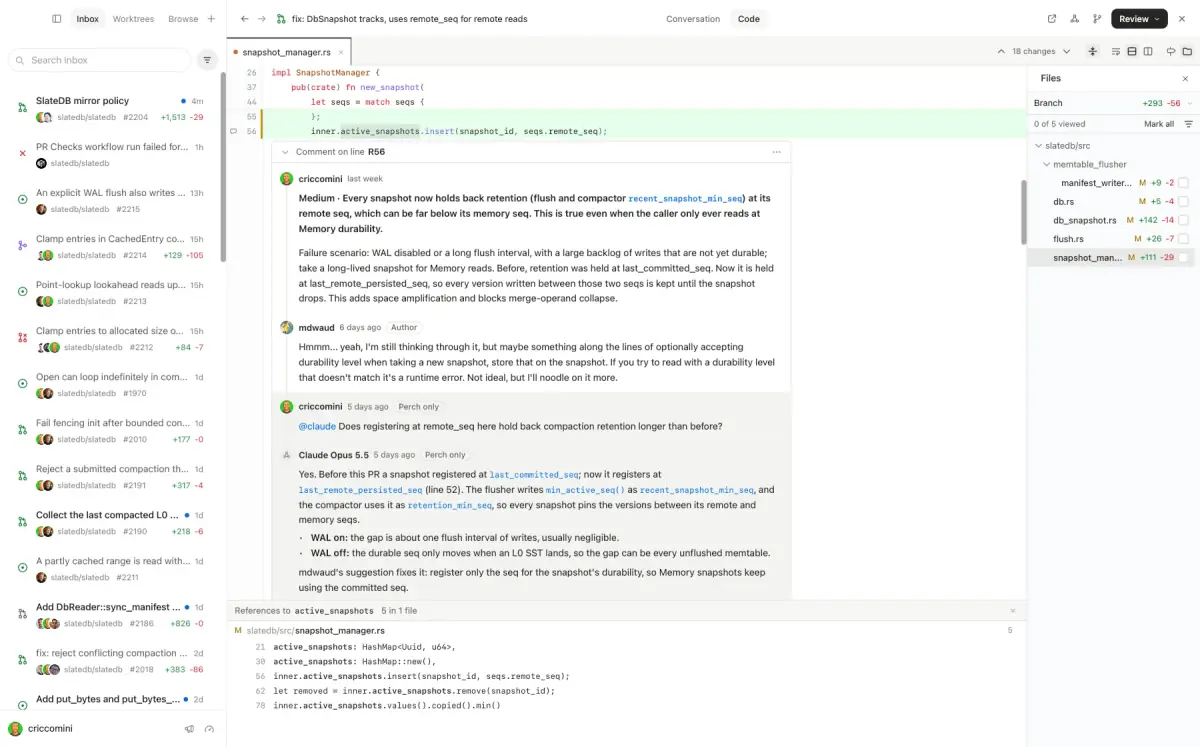
Perch is a native app from perch-code that brings GitHub, a code browser, and coding agents into one window. Developers can inspect pull requests, browse the related code, and use tools such as Claude Code or Codex for client-side AI reviews. They can also discuss code with people or agents.
Highlights:
- Integrates GitHub inbox, pull requests, and issues.
- Lets you browse the codebase for each pull request and code review.
- Supports client-side reviews with Claude Code, Codex, Gemini, or OpenCode.
How to use:
- First, install Git and GitHub CLI, then sign in with `gh auth login`.
- Next, install Perch with `curl -fsSL https://perch.chat/install.sh | sh`.
- Finally, open Perch to browse code. To use a coding agent, install and sign in to a supported agent CLI.
Who it's for:
Developers who want to browse GitHub code and use AI-assisted reviews in one window.
Before you start:
- Perch supports Mac and Linux; Linux requires the system dependencies listed by the project.
- Perch reads local repositories and looks for a GitHub access token. It may start language servers when browsing code; rust-analyzer and jdtls run build code from the checkout and ask before starting on someone else's work.
- Agents run in a sandbox, with permissions selected by the user. If you use these features, weigh the safety risks yourself. AI Inspiration World is not responsible for any consequences.
- The project uses the Apache 2.0 license. The page does not specify pricing.
Based on the project's public documentation. Not tested by AI Inspiration World.