
 AI Inspiration World
What it is
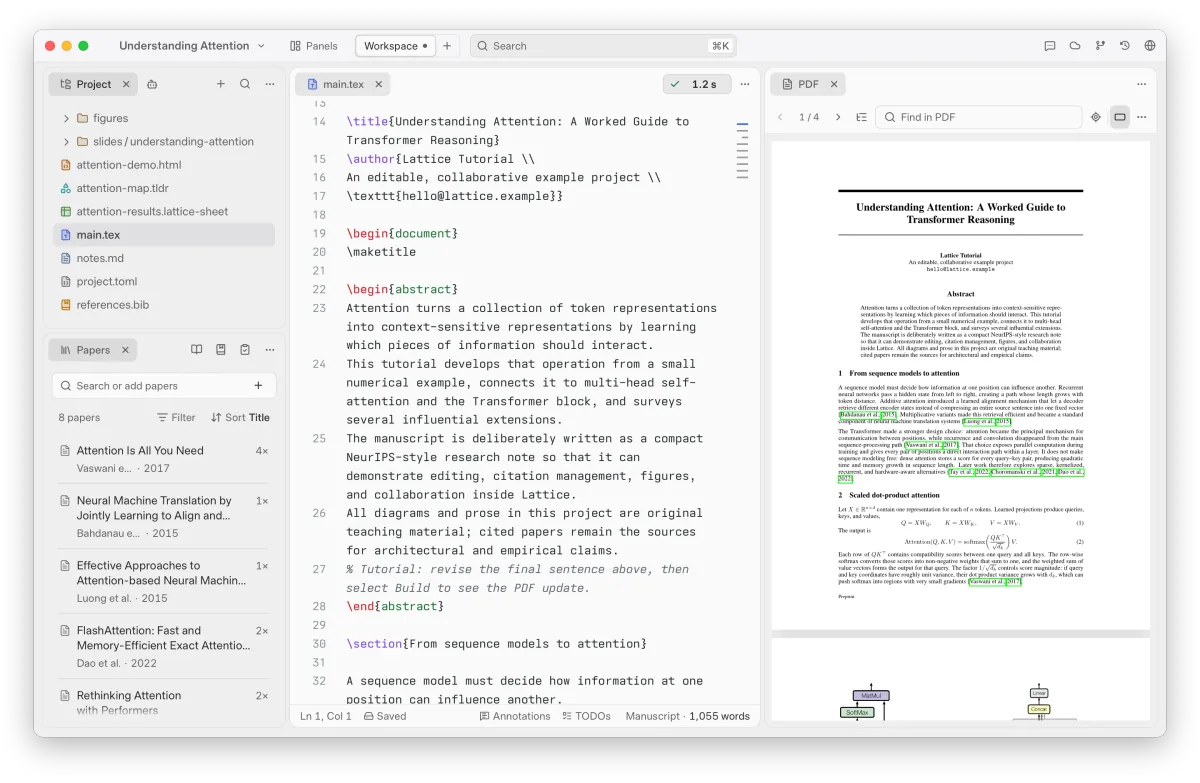
Lattice is an open-source, local-first LaTeX workspace by GitHub user leo1oel, mainly for Mac. Your paper project stays an ordinary folder on disk, so it works offline, opens in other editors and fits under Git; Overleaf is a sync target. Source and PDF sit side by side, with completion and diagnostics as you type, two-way jumps between source and PDF, and one-click builds with your own TeX Live. The Agent panel runs Claude Code, Codex or another agent CLI on your Mac, such as Cursor, signed in as you. Lattice comes with no model and no AI subscription of its own. The agent reads your project and papers, fixes build errors and edits files, and every change shows as a diff you can review or undo. What sets it apart is two-way Overleaf sync: your co-authors stay on Overleaf and their edits arrive as they type.
Highlights:
- Select text to proofread or polish it, with a reason for each edit; or annotate the source or PDF and have the agent propose an edit for each note, which you accept or reject.
- Add papers by arXiv ID, DOI, title, link or BibTeX, or from Zotero; Check references audits your bibliography against Crossref.
- It comes with NeurIPS, ICML, ICLR, ACL, CVPR and AAAI templates plus two thesis classes, and Export for arXiv writes one ZIP that builds on its own.
How to use:
- First, download the .dmg from GitHub Releases and drag Lattice into Applications; on an Intel Mac, use the file ending in `_x64.dmg`.
- Then open a folder, start from a template or connect an Overleaf project.
- Finally, open Guided tutorial in the project menu for a six-step checklist from building the PDF to letting the agent revise a paragraph.
Who it's for:
Researchers who write papers in LaTeX and collaborate with co-authors on Overleaf.
Before you start:
You need macOS 14 or later on Apple silicon or Intel, and your own MacTeX or TeX Live; if TeX is missing, it offers to install BasicTeX. The Linux version is experimental and the built-in agent is not available there yet. The Agent panel runs tools such as Claude Code and Codex under your own login, reads your project files and edits them directly. If you use these features, weigh the safety risks yourself. AI Inspiration World is not responsible for any consequences. Lattice is free; the agents you connect bill through their own subscriptions, so refer to their websites. The license is Apache-2.0 (releases up to 0.1.341 were GPL-3.0-or-later). The tldraw whiteboard needs a license key for production use, and the Trellis panel layout is free only for non-commercial use. Refer to the official website for the license.
Based on the project's public documentation. Not tested by AI Inspiration World.