
 AI Inspiration World
What it is
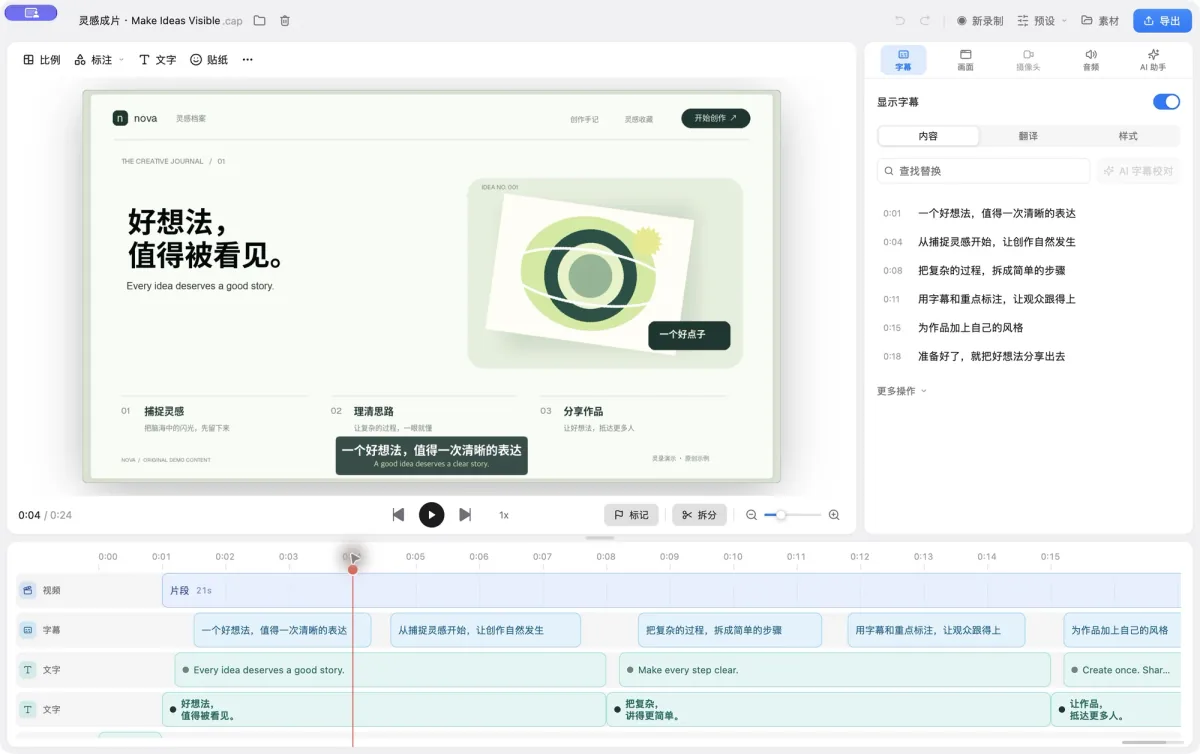
Capwise (灵录) is an open-source screen recording and editing studio for Mac by X user vista8 (GitHub joeseesun), built on the open-source recorder Cap. Screen, camera and sound go into one project, and captions, visuals, music, voiceover and a cover are handled in the same window before you export a video or caption file. The author says on X that Opus 5.5 built the face retouching, bilingual caption generation, local and cloud speech recognition and filler-word handling. The built-in AI editing assistant takes a one-line request, such as hiding filler words in the captions or translating captions into French and showing both languages. It proposes a plan first, and you review, apply or undo it. What sets it apart is that every step after recording happens in one local editor, so you don't move files between several tools.
Highlights:
- Automatic zoom, cursor effects and annotations draw viewers to the key actions.
- Captions are handled in Content, Translation and Style tabs; the original and translated text can have their own font, colour and outline, and you can export SRT or VTT on their own.
- A built-in teleprompter keeps writing and reading separate, with scrolling, speed control and recording sync.
How to use:
- First, download Capwise.dmg from GitHub Releases, drag Capwise into Applications and launch it.
- Then grant screen recording permission when asked, and microphone or camera permission if you need them.
- Finally, record a video or import one, edit the captions, visuals and sound, and click Export.
Who it's for:
Mac users who record product demos, software tutorials or course lessons.
Before you start:
The current build supports Apple silicon Macs on macOS 13.3 or later; there are no verified builds for Intel, Windows or Linux. It needs screen recording permission, plus microphone and camera permission for voice and camera. AI features are optional and use your own model service keys, which are stored in the macOS login Keychain. With cloud caption recognition, audio is sent to the service you choose; caption proofreading, translation and assistant requests send the relevant caption text to the model you choose; cover generation sends the image description to the image service. The author says on X that it supports a CLI so third-party agents can start recordings. If you use these features, weigh the safety risks yourself. AI Inspiration World is not responsible for any consequences. The app is free; model services may charge, so refer to each provider's website for costs. The license is AGPLv3, with some code under other terms; refer to the repository for details.
Based on the project's public documentation and the author's posts on X. Not tested by AI Inspiration World.